Keyloggers are hidden tools used by hackers to record everything you type, including passwords and personal data. In this blog, learn how it’s work and how you can detect and protect your device from these silent threats.
This represents one of the most insidious cyber threats today, silently capturing every keystroke you make on your device. These malicious programs or devices log sensitive information like passwords, credit card details, and private messages, paving the way for identity theft and financial loss. In cybersecurity, it stand out for their simplicity and effectiveness, often evading basic defenses while enabling larger attacks such as ransomware or phishing schemes. This blog dives deep into their inner workings, types, detection methods, and prevention strategies. By the end, you will gain the knowledge to safeguard your digital life against these stealthy invaders.
What Are Key-loggers Exactly
Keyloggers capture keystrokes to steal sensitive data, forming a core component of many malware campaigns in cybersecurity.
- Keystroke logging involves recording every key press, including timings and sequences, which attackers later analyze to reconstruct typed content.
- They target input from keyboards across operating systems, turning ordinary typing into a vulnerability for data exfiltration.
- In broader malware ecosystems, this often pair with trojans, enhancing threats by combining input monitoring with remote access capabilities.
- Cybersecurity experts classify them as input monitoring tools that bypass user awareness, making them ideal for espionage in corporate or personal environments.
- Real-world scenarios show this is embedded in email attachments, where initial infection leads to prolonged data harvesting without visible symptoms.
- Their persistence stems from rootkit integration, allowing them to survive reboots and hide from standard system scans.
How Software Keyloggers Operate
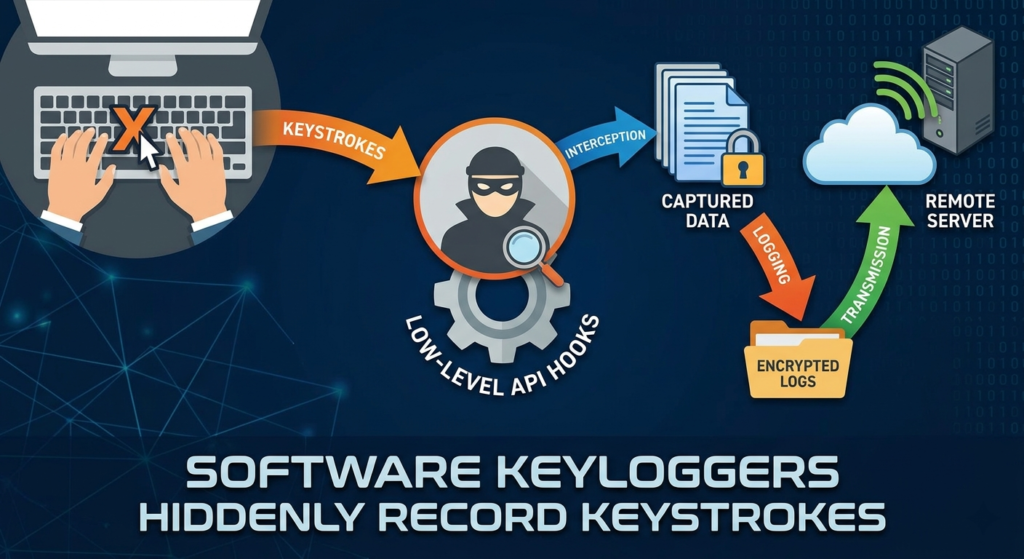
Software keyloggers deploy through malicious code that hooks into the operating system’s keyboard input processes, enabling covert keystroke capture.
- They inject themselves via low-level API hooks, intercepting keyboard events before they reach applications like browsers or email clients.
- Once active, these are store captured data in encrypted logs on the device or transmit it periodically to attacker controlled servers.
- Behavioral analysis reveals their use of memory injection techniques, where they load into legitimate processes to mask their presence.
- In cyber attacks, software excel in phishing campaigns, logging credentials entered on fake login pages.
- They evade initial detection by mimicking system processes, only triggering alerts during advanced endpoint protection scans.
- Transmission often occurs over encrypted channels, complicating network based malware detection efforts.
Understanding Hardware Keyloggers
Hardware keyloggers physically intercept keyboard signals, offering a tamper resistant alternative to software variants that antivirus software struggles to identify.
- These devices connect between the keyboard cable and computer port, passively recording signals without software installation.
- Advanced models include onboard memory for thousands of keystrokes, downloadable later via USB connection by the attacker.
- In corporate espionage, hardware key loggers target shared workstations, capturing collective inputs without per user software deployment.
- Their detection challenges arise from physical concealment, such as inside keyboard housings or disguised as adapters.
- Cybersecurity incidents highlight their use in supply chain attacks, where compromised peripherals arrive pre infected.
- Unlike software counterparts, they remain functional even if the host system reboots or runs full antivirus sweeps.
Key Signs of Keylogger Infections
Detecting it’s requires vigilance for performance anomalies and unusual system behaviors that signal hidden input monitoring activities.
- Sudden slowdowns in typing response times indicate background processes logging and processing keystrokes in real time.
- Unexpected network traffic spikes, especially to unknown IP addresses, suggest data exfiltration from captured logs.
- High CPU or memory usage from unidentified processes points to keylogger operations running alongside legitimate tasks.
- Infected systems often show disabled security features, like antivirus real time protection turned off without user intervention.
- Browser extensions or unfamiliar programs appearing in task managers serve as common vectors for software keyloggers.
- Physical inspections reveal hardware keyloggers through mismatched ports or unfamiliar devices on keyboard connections.
Effective Detection Methods for Keyloggers
Malware detection combines automated tools with manual checks to uncover key-loggers through behavioral analysis and system forensics.
- Run full system scans with reputable antivirus software trained on keystroke capture signatures and heuristics.
- Employ endpoint protection platforms that monitor API calls related to keyboard hooks and input interception.
- Use process explorers to inspect running tasks for suspicious modules loaded into keyboard driver processes.
- Network monitoring tools flag outbound connections carrying encoded keystroke data packets.
- Boot into safe mode to isolate and terminate persistent it that rely on normal OS environments.
- Forensic analysis of log files reveals timestamped entries matching user activity patterns indicative of logging.
Step by Step Keylogger Removal Guide
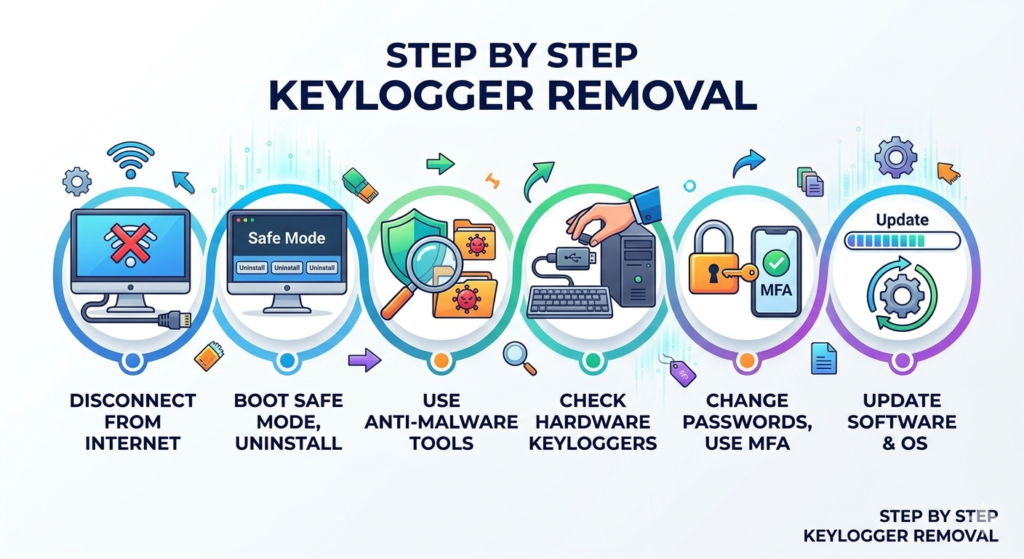
Removing this key loggers demands a systematic approach to terminate active threats, clean remnants, and restore system integrity.
- Disconnect from the internet immediately to halt data transmission and prevent further compromise.
- Boot into safe mode and uninstall suspicious programs identified during initial scans.
- Leverage specialized anti malware tools for deep cleaning of registry entries and hidden files linked to keyloggers.
- Physically inspect and remove any attached hardware devices between keyboard and computer.
- Change all passwords from a clean device, prioritizing multi factor authentication for recovery.
- Update the operating system and all software to patch vulnerabilities exploited by the initial infection.
Advanced Prevention Against Keyloggers
Preventing keylogger infections builds layered defenses, integrating user habits with technical safeguards for comprehensive endpoint protection.
- Enable virtual keyboards for entering sensitive data, bypassing physical and software input capture entirely.
- Implement application whitelisting to block unauthorized programs from accessing keyboard APIs.
- Regularly audit system processes and network logs for anomalies tied to keystroke logging behaviors.
- Train on phishing recognition, as email links remain primary delivery for software keyloggers.
- Use full disk encryption to render captured keystroke data useless without decryption keys.
- Deploy group policies in enterprises to restrict USB device usage, curbing hardware keylogger risks.
Conclusion
Keyloggers pose a persistent danger by silently harvesting keystrokes, but armed with knowledge of their software and hardware mechanisms, detection signs, removal steps, and prevention tactics, you can neutralize these threats effectively. From API hooks in software variants to physical intercepts in hardware models, understanding their operations empowers proactive defense. Behavioral analysis and endpoint protection form the backbone of detection, while habits like virtual keyboards and system audits prevent infiltration. In today’s cyber landscape, where it’s fuel ransomware and phishing, ignoring them invites disaster. Stay vigilant, scan regularly, and adopt multi layered security to protect your data. Take action now: run a full system scan today and enable virtual input for passwords. Your digital security depends on it.
